Four deployment modes. One agent team.
This page is for the IT Director or security reviewer deciding where a Brainverse agent team will physically run. The four modes differ in where the runtime executes, where the data lives, and who operates the identity layer. The agent team itself, the hooks, the skills, and the contract shape of the engagement do not change between modes. What changes is the shared-responsibility allocation between your team, Brainverse, and the infrastructure providers we each depend on. Most small teams land on Mode C (Brainverse-hosted) unless they have a specific reason not to. Teams with existing AWS/Azure and an InfoSec function often choose Mode B. Pick the mode that matches your InfoSec posture; the mode decision does not limit which agents you can deploy.
If you are looking for the shorter version, the four-mode summary on the hub landing page at brainverse.ai/security is written for a 30-second read. This page is the full matrix for the person who has to defend the decision internally.
The matrix.
The matrix below is the full 17-row version of the four-mode summary shown on the hub landing page. Every row describes the default configuration; each dimension is independently tunable during the Discovery phase of the engagement. Below the matrix, individual sections deep-dive the egress allowlist, the corporate-firewall compatibility, BSA/BAA eligibility, and training-data protection per mode.
| Dimension | Mode A, Local-only | Mode B, Client-hostedCompanion guide ↓ | Mode C, Brainverse-hosted | Mode D, Hybrid |
|---|---|---|---|---|
| Summary | Runtime lives on a practitioner's laptop. The only outbound call is inference. | Runtime lives in your AWS / Azure / GCP environment. Your cloud, your IAM, your egress policy. | Runtime lives on Brainverse-operated infrastructure (Railway). Fastest to deploy. | Runtime local or client-hosted. Dashboard and memory on Brainverse-hosted infrastructure. |
| Who runs the agent runtime | Your end user on their own laptop (macOS, Windows WSL2, Linux) | Your cloud. ECS/EKS on AWS; App Service/AKS on Azure; Cloud Run/GKE on GCP. | Brainverse-managed cloud containers. | Local runtime on laptops, or client-hosted runtime in your cloud. |
| Who runs the memory database (BrainSync Postgres) | Local SQLite fallback, or no persistent memory DB. | Your RDS / Aurora / Azure Database for PostgreSQL / Cloud SQL. | Brainverse-hosted Postgres. | Brainverse-hosted BrainSync; runtime still local or client-side. |
| Who runs the dashboard (BrainSync web UI) | None. Terminal-only or desktop app. | Your Railway / App Service / Cloud Run, or Brainverse-hosted with client SSO. | Brainverse-hosted on Railway. | Brainverse-hosted dashboard, local or self-hosted runtime. |
| Data residency, client documents | Only on the laptop. Never uploaded. | Your cloud storage. S3 / Azure Blob / GCS. Encrypted with your KMS / Key Vault / Cloud KMS keys. | Brainverse Railway storage (us-east by default; eu-west on Enterprise). | Stays wherever the runtime is. |
| Data residency, agent memory entries | Local file or your Postgres. | Your Postgres. | Brainverse-hosted Postgres. | Brainverse-hosted Postgres. |
| Credentials storage | OS keychain (macOS Keychain, Windows Credential Manager, GNOME Secret Service). | AWS Secrets Manager / Azure Key Vault / GCP Secret Manager. | Brainverse cloud env vars, encrypted at rest (AES-256). | Local keychain for runtime; Brainverse cloud env for dashboard. |
| LLM calls route through | api.anthropic.com directly, or via your proxy. | Your existing Anthropic / Bedrock / Azure OpenAI endpoint under your API keys. | Brainverse's Anthropic commercial account with Zero Data Retention enabled by default, or your Anthropic key proxied. | Your endpoint, or Brainverse's, depending on which leg you trust. |
| Typical client fit | 1-5 person firms, regulated or privileged work, strict compliance posture. | 50-500+ employees, existing cloud standardization, mature InfoSec, regulated. | 2-25 employees, small operations team, turnkey delivery preferred. | Mid-market (25-250) that wants local control of data but does not want to run a dashboard. |
| Setup complexity (Brainverse work) | 1-2 days: provisioning script, signed binary, onboarding walkthrough. | 5-10 days: Terraform / Bicep / Deployment Manager modules, IAM integration, CI/CD wiring, runbook walkthrough. | Under one day: provisioning automation already exists. | 2-4 days: hybrid connector and scoped IAM role. |
| Monthly cost implications | Zero infrastructure cost; only inference token spend. | Your cloud infra cost (estimated $80 to $400 per month for a small team, $1,000 to $4,000 for a mid-sized team) plus token spend. | Included in flat-fee delivery plus optional BrainSync retainer. | Between Mode B and Mode C. |
| BSA / BAA alignment | Your Anthropic BAA if you have one. If you do not, Brainverse can scope an Anthropic BAA case-by-case as a custom Enterprise addendum per hub FAQ; Brainverse does not operate a productized standard BAA today. | Your AWS / Azure / GCP BAA plus your Anthropic BAA. | BAA available as a custom Enterprise addendum; not productized. Mode C is not compatible with HIPAA-regulated workflows per §6.3. For HIPAA-covered workflows, see Mode A or Mode B under your own BAA with the inference provider. Talk to sales. | Overlap. Your infrastructure BAAs cover your side; Brainverse BAAs cover the hosted side. |
| Where logs land | Local disk, rotatable, encrypted via FileVault / BitLocker / LUKS. | Your CloudWatch / Azure Monitor / GCP Cloud Logging; optionally mirrored to your SIEM (Splunk, Sentinel, Elastic). | Brainverse Logflare and Sentry; weekly export to a client bucket on request. | Logs land at the runtime tier; dashboard events land with Brainverse. |
| Audit trail access | brainsync export-audit CLI writes a JSON bundle to local disk. | Full client-side query access; logs are in your log store. | BrainSync dashboard /audit view plus on-request JSON export. | Dashboard for dashboard events; client-side tooling for runtime events. |
| Upgrade and maintenance | You pull via brainverse update (git pull with reproducible build metadata and visible commit history). Cadence is opt-in. | Your CI/CD picks up Brainverse-tagged releases when you elect to upgrade. Releases are published to GitHub with reproducible build metadata and visible commit history; a signed release feed is on the roadmap. | Fully managed by Brainverse (scheduled maintenance windows; client opt-in for major version bumps). | Split. Dashboard auto-upgraded; runtime upgraded on your cadence. |
| Offline operation | Full, except the inference call. | Possible with Bedrock or Azure OpenAI in the same VPC (fully VPC-internal inference path). | Not supported. | Local runtime keeps working offline for everything except inference. |
| Hardening level (default) | Host OS hardening (FileVault, firewall, signed binaries). | IAM least-privilege, private subnets, VPC endpoints, KMS CMKs, Security Hub or Defender for Cloud enabled. | Postgres Row-Level Security plus authenticated dashboard plus private networking. | Both tiers' controls apply to their respective slices. |
Modes A and B can run without the BrainSync dashboard at all. The dashboard is an optional observability layer. The agent team itself is a Claude Code harness plus agents, skills, and hooks, and it does not require the dashboard to function. We often recommend dashboard-less deployment for the first 30 days of a Mode A engagement to minimize attack surface during trust-building.
Brainverse staff do not have standing access to client data. Operational access is per-incident, time-boxed, and logged. Mode C is the mode where Brainverse operates persistent runtime and memory infrastructure on the client's behalf; in Modes A and B, the runtime lives on your side entirely. For the GitHub repository itself, active engagements may include scoped per-engagement credentials for repo-level support, disclosed in the engagement's security evidence folder and revocable by you at any time. See the honest-limits table on the hub for the canonical description of Brainverse staff access.
Reference architectures.
The diagrams below use the same visual grammar so you can compare them at a glance. Every diagram follows the convention that anything inside a dashed line is inside the relevant trust boundary; every arrow that crosses a boundary is a call you can put on an egress allowlist.
3.1 Mode A, Local-only
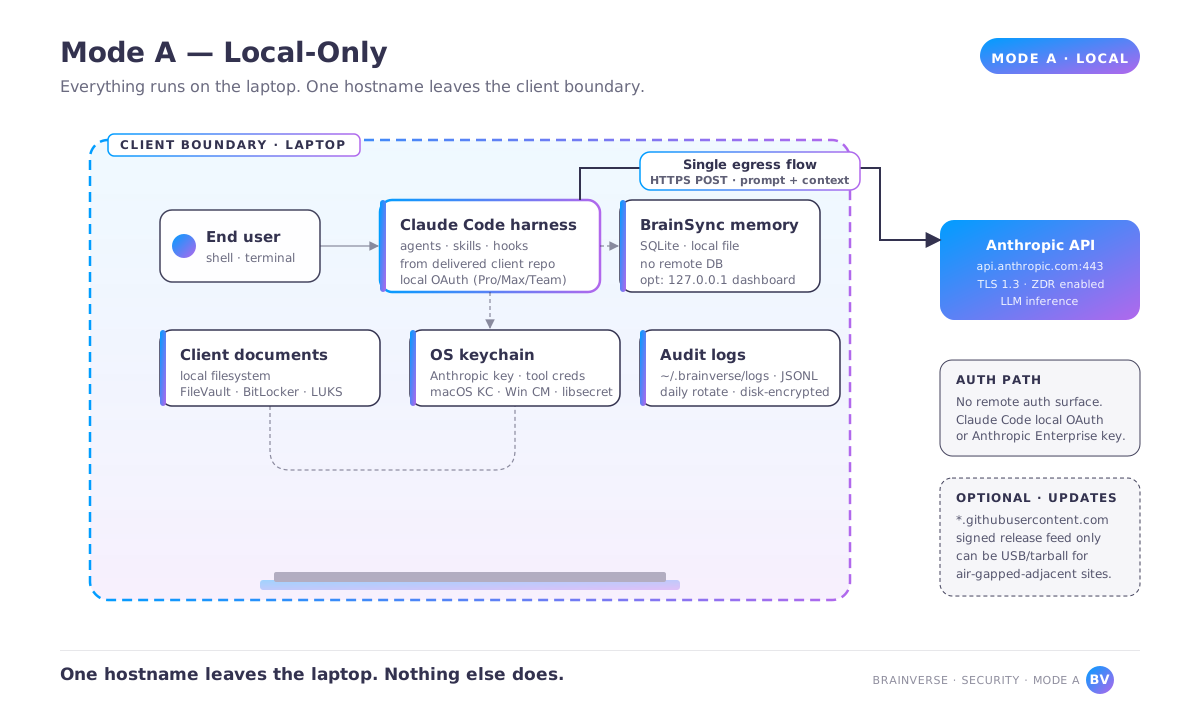
api.anthropic.com. Optional install-time traffic to GitHub is shown dashed.3.2 Mode B, Client-hosted (AWS reference; Azure and GCP analogs follow the same shape)
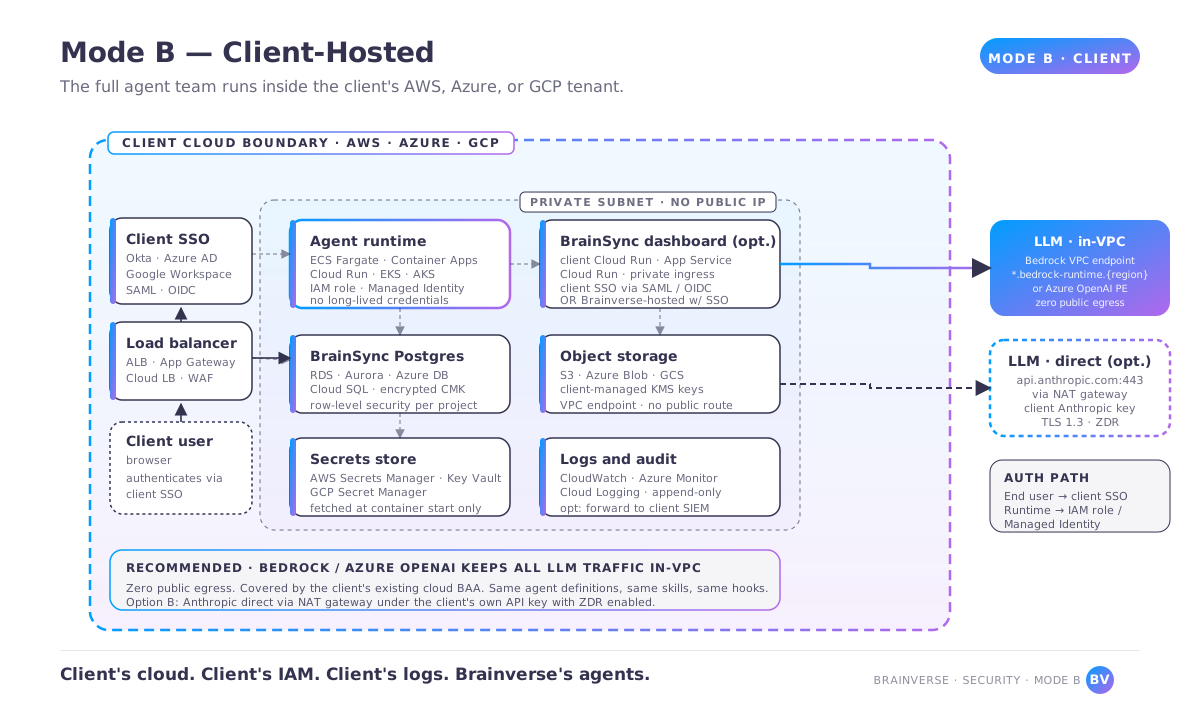
3.3 Mode C, Brainverse-hosted
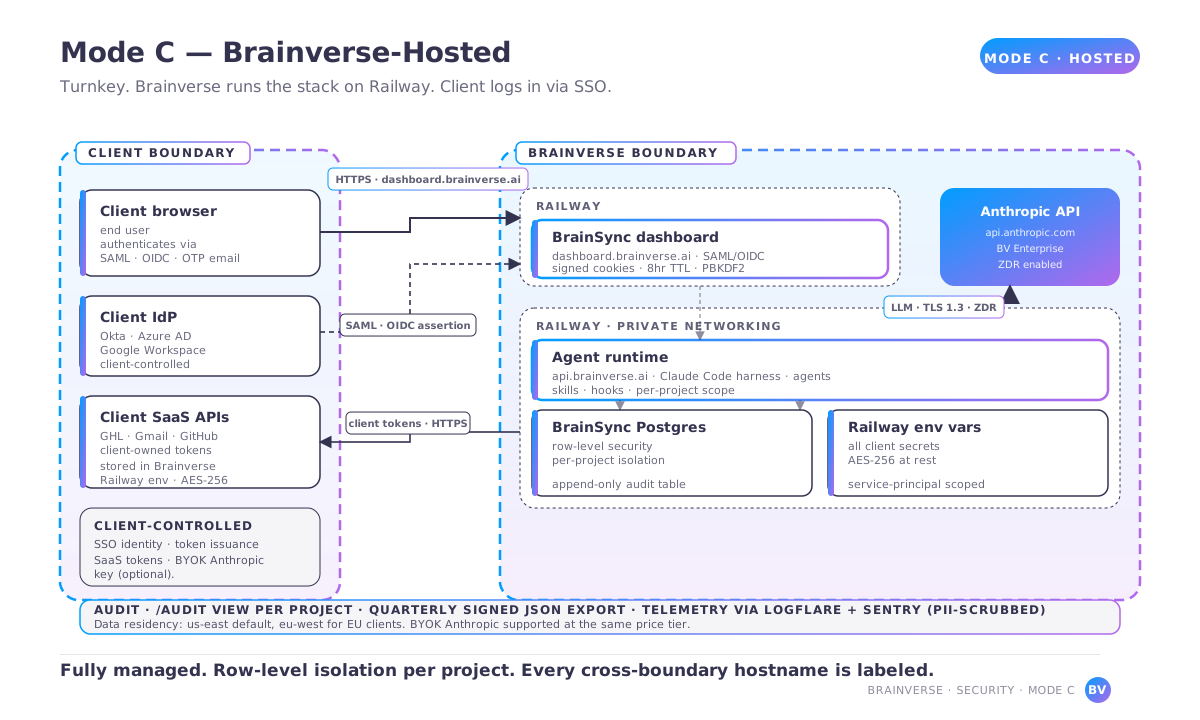
3.4 Mode D, Hybrid
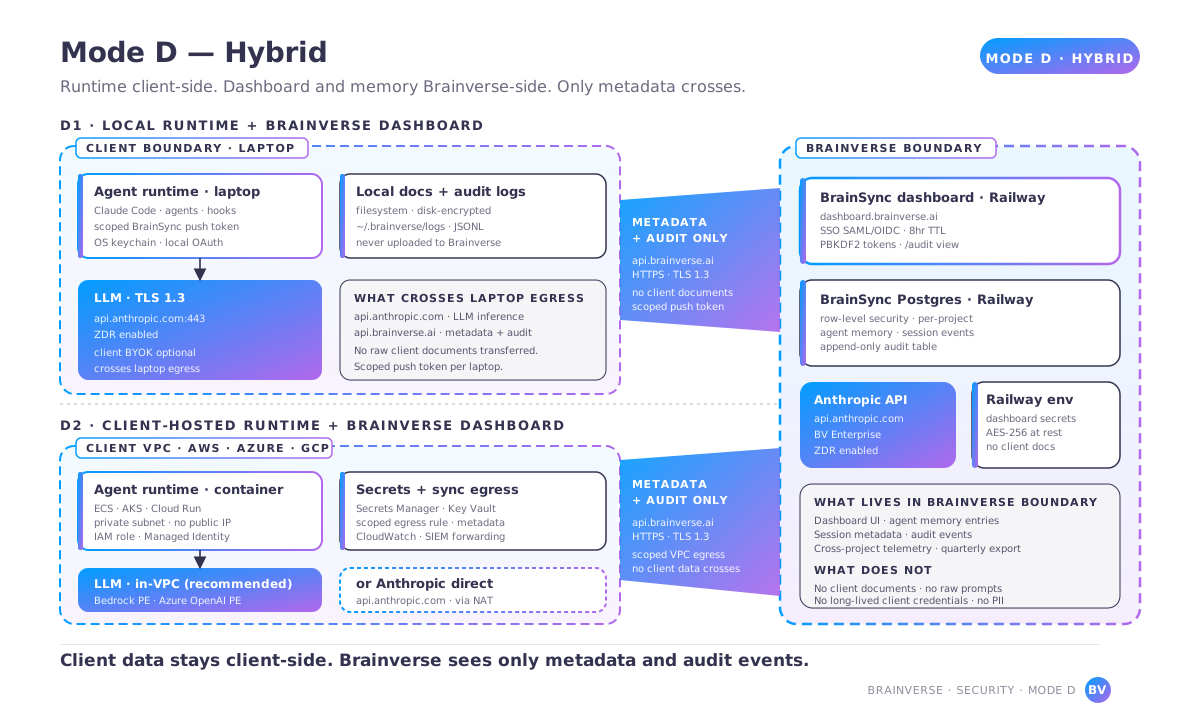
What to put on your allowlist, per mode.
The most common reason a corporate pilot stalls is an unexpected egress block. The hostnames and ports below are the minimum runtime set; if your firewall requires explicit approval of every destination, this is the list.
4.1 Mode A, Local-only
| Hostname | Port | Protocol | Purpose | Required |
|---|---|---|---|---|
api.anthropic.com | 443 | HTTPS, TLS 1.3 | Inference | Yes |
statsig.anthropic.com | 443 | HTTPS | Claude Code feature flags | Yes; can be stubbed for strict environments |
github.com, *.githubusercontent.com, objects.githubusercontent.com | 443 | HTTPS | One-time agent repo clone plus signed update feed | Yes during install or update only |
registry.npmjs.org | 443 | HTTPS | Node tool install during setup | Yes during install only |
files.pythonhosted.org, pypi.org | 443 | HTTPS | Python tool install during setup | Only if your agent team includes Python tools |
For strict environments, all install-time egress can be satisfied once via a bastion host and then disabled. Runtime egress collapses to api.anthropic.com. Any additional MCP integration adds its own hostname; the minimum-minimum is one.
4.2 Mode B, Client-hosted
When you use AWS Bedrock for inference (our recommendation for Mode B on AWS):
- Zero public egress is required. All traffic stays inside the VPC via the
com.amazonaws.{region}.bedrock-runtimePrivateLink endpoint. - Secrets Manager, S3, and CloudWatch are all accessed via VPC endpoints. Zero public egress.
When you use the Anthropic API directly:
api.anthropic.com:443via your NAT gateway or egress proxy.
Client SaaS integrations use your existing allowlist. The Brainverse runtime adds no hostnames beyond the inference endpoint.
4.3 Mode C, Brainverse-hosted
| Hostname | Port | Protocol | Purpose |
|---|---|---|---|
dashboard.brainverse.ai | 443 | HTTPS | BrainSync dashboard UI |
api.brainverse.ai | 443 | HTTPS | BrainSync REST and SSE |
brainverse.ai | 443 | HTTPS | Marketing site and auth redirects |
*.railway.app (BrainSync origin) | 443 | HTTPS | Direct BrainSync origin if not using the custom brainverse.ai subdomain |
| Your SSO identity provider (Okta, Microsoft Entra ID, Google Workspace) | 443 | HTTPS | Authentication, already allowlisted client-side |
For your browser and any client-side automation:
4.4 Mode D, Hybrid
Union of the Mode A or Mode B runtime set plus the Mode C client-browser set, minus anything already covered.
How the runtime behaves behind corporate network controls.
5.1 Proxy support
HTTPS proxies with authenticated tunneling (Basic, NTLM, Kerberos) are supported via standard HTTPS_PROXY and NO_PROXY environment variables in Modes A, B, and D. The Claude Code harness, the BrainSync client, and the Python tools all honor these variables natively. Outbound calls from your cloud in Mode B typically route through a central egress proxy (Zscaler, Palo Alto GlobalProtect, AWS Network Firewall); the runtime is tested behind all three.
5.2 SSL and TLS inspection
The runtime validates server certificates by default. When you operate an SSL-inspecting proxy that decrypts outbound TLS, you will need to install your inspection CA into the runtime's trust store. We document the exact files to modify during engagement setup: Node.js NODE_EXTRA_CA_CERTS, Python REQUESTS_CA_BUNDLE and SSL_CERT_FILE, and the OS-level CA chain for other tools.
If your corporate policy pins certificates for `api.anthropic.com` (rare, but not unheard of in defense contexts), you will either need to disable pinning for the inference endpoint or route inference through Bedrock or Azure OpenAI instead. This decision lives in your infrastructure team; we will document both paths during Discovery.
5.3 Strict egress policies
For environments that will only allowlist a very small number of hostnames (common in defense and finance), Mode A achieves the strictest posture: one runtime hostname (api.anthropic.com) plus optional GitHub for updates. We have delivered into environments with egress restricted to exactly these two hostnames.
5.4 Air-gapped-adjacent deployments
Fully air-gapped deployment is not supported. Inference requires network access to Anthropic or your Bedrock or Azure OpenAI endpoint. Air-gapped-adjacent deployment is supported: the laptop or runtime talks only to a single endpoint on a private network, which then forwards to the inference provider. We provide a reference implementation using a client-hosted proxy that forwards only api.anthropic.com calls and blocks everything else.
How existing agreements flow through Brainverse delivery.
Clients with mature InfoSec programs usually have existing master agreements, BAAs, and DPAs with the major vendors. Brainverse's delivery respects those agreements rather than replacing them.
6.1 Hyperscaler agreements (Mode B and Variant D2)
If you have an AWS Enterprise Agreement plus BAA, the entire agent runtime, memory DB, and file storage in Mode B run under that agreement. Brainverse executes your required third-party access agreement where your procurement team requires one. The same applies to Azure Enterprise Agreements and Google Cloud BAAs. Your InfoSec team confirms on their end that the BAA covers the specific services we use (ECS / Fargate / RDS / S3 / Secrets Manager / Bedrock for AWS; equivalent stacks on Azure and GCP).
6.2 Anthropic agreements
If you have an Anthropic commercial account with a BAA, we configure the agent team to use your API key with Zero Data Retention enabled. No Brainverse Anthropic account is involved. This covers Modes A, B, and D when you prefer your own key.
If you do not have an Anthropic agreement, the inference call runs under Brainverse's Anthropic commercial account, which has Zero Data Retention enabled by default. Brainverse's DPA covers the processing. This is the default for Mode C and is available in Modes A, B, and D on request.
If you route inference through AWS Bedrock under your AWS BAA, no Anthropic-direct connection exists. Mode B only.
If you route inference through Azure's Models-as-a-Service for the providers available in that program, the routing is handled identically to Bedrock. Mode B only.
Your verification: confirm Zero Data Retention is enabled on your Anthropic workspace (or Bedrock / Azure routing is used). Brainverse's pre-deployment checklist includes the exact console path to confirm.
6.3 HIPAA BAAs
HIPAA BAAs are evaluated case-by-case as a custom Enterprise addendum. Brainverse does not currently operate a productized standard BAA. Deployments that process Protected Health Information must operate in Mode A or Mode B under your own BAA with your inference provider. Brainverse executes a BAA as a business associate where required by the engagement. Mode C is not compatible with HIPAA-regulated workflows. For details, contact [email protected].
6.4 GitHub Enterprise
If you are on GitHub Enterprise Cloud or GitHub Enterprise Server, Brainverse delivers the agent team as a repo into your GHE instance (Mode B) or into your GHE Cloud organization (Modes B, C, or D). Brainverse personal access tokens never enter your environment. The runtime uses a scoped GitHub App installation under your GHE admin. Brainverse's agent definitions are delivered as a one-time clone; subsequent updates are tagged releases that your CI pulls when you elect to upgrade. Releases are published to GitHub with reproducible build metadata and visible commit history; cryptographic signing of release tags is on the roadmap. Your verification: GHE audit logging enabled, SSO enforced on the target organization, and the GitHub App's requested scopes match the documented scope list (read repo, read and write PR for self-updating agents that open PRs).
6.5 Google Workspace
If your team uses Google Workspace with a signed DPA, the Gmail, Drive, and Calendar integrations run under a domain-wide delegation service account that your Workspace admin provisions. The service account is scoped to the specific APIs needed (for example, gmail.readonly, calendar.readonly, drive.file). No Brainverse Google account touches client data. Your verification: the delegated scopes match the documented list, the service account has audit logging enabled, and your Workspace apps-with-access review is clean.
How each mode handles inference data and model training.
Anthropic publishes its data policy directly at anthropic.com. As of this writing, Anthropic states that API data is not used to train its models. For clients who want the strongest posture available, we can configure zero-data-retention on the Anthropic endpoint (available directly from Anthropic or through Bedrock / Azure OpenAI). Brainverse does not train models. Training-data protection is therefore a policy of the LLM provider you contract with (directly or through us), not a Brainverse-level guarantee.
7.1 Per-mode configuration
| Mode | Default training-data protection | Additional controls available |
|---|---|---|
| Mode A, Local-only | Brainverse's Anthropic commercial account has Zero Data Retention enabled by default. If you use your own Anthropic workspace, you configure ZDR on your side and we verify before go-live. | Optional: migrate to Mode B and route through Bedrock for fully in-VPC inference. |
| Mode B, Client-hosted | Your Anthropic key with ZDR, or Bedrock (AWS's configurable data-retention controls; default is no training use), or Azure OpenAI (Azure's commercial terms describe the applicable data handling). | IAM boundary policies pinning the inference service principal to your region. VPC endpoints preventing fallback to public inference endpoints. |
| Mode C, Brainverse-hosted | Brainverse's Anthropic commercial account, Zero Data Retention enabled by default. Brainverse's commercial terms with clients prohibit Brainverse from using client data to train, fine-tune, or aggregate. | You can bring your own Anthropic key and retain direct control at the same price tier. |
| Mode D, Hybrid | Same as whichever mode hosts the inference call leg. | Same as whichever mode. |
7.2 What Brainverse does not do
Brainverse does not train or fine-tune models. Brainverse does not aggregate client data for product improvement. If you deploy in Mode C, your prompts and outputs route through Brainverse's Anthropic account with Zero Data Retention; they are not retained on Brainverse-owned infrastructure beyond the 30-day operational support window described in the engagement's security evidence folder.
7.3 Configuration options we specifically expose
- Anthropic Zero Data Retention toggle. Confirmed on workspace creation. Verified pre-go-live with a screenshot from the Anthropic console committed to the engagement's security evidence folder.
- Per-tool data retention. For integrations that may call out to logging tools (Sentry, Logflare), we configure PII-scrubbing patterns specific to your data categories. Default retention is capped at 30 days unless your compliance requirement exceeds that.
- Memory opt-out patterns. BrainSync memory entries can be configured per-agent to exclude entire content classes. The memory push hook applies scrubbing regex patterns for known secret patterns before data leaves the runtime; general PII categories (SSN, date of birth, account numbers) are on the roadmap as a configurable per-engagement pattern.
Scoped sub-teams within one organization.
Some workspaces inside a client organization are sensitive even from the rest of the company — leadership planning, people operations, internal finance operations, or any other workspace your access policy treats as a separate compartment. The same isolation pattern that scopes access between separate clients can be configured one level deeper, inside a single client. Brainverse documents the pattern and helps configure it during onboarding; the customer operates the boundary.
How it is configured
The configuration combines three primitives, each enforced by a system the customer controls.
- One shared agent-definitions repo holds agent definitions, hooks, and skills. Visibility of the shared repo is your decision — org-wide read makes improvements flow centrally and is a common choice; restricted-team access is also supported. You set the visibility in GitHub.
- Per-team scoped repos — one per compartmented workspace — each with its own GitHub team ACL. The shared agent-definitions repo is included in each scoped repo as a git submodule, pinned to a known commit. The sub-team gets the full agent roster against their own data without a fork; updates to the shared roster are picked up by bumping the submodule pointer with the same review path as any other code change.
- One BrainSync project per scoped repo , each with its own bearer token. Memory entries, session logs, and dashboard queries are partitioned by
project_idat the Postgres row level — the same Layer 3 mechanism that partitions cross-client memory. A query authenticated under one project's bearer token does not return rows tagged with a different project's ID.
What this gives you, when configured to the recommended baseline
- The team that owns the scoped workspace runs the same agent roster the rest of the organization runs, against their own data, without a separate copy of the team.
- Users without team membership and without inherited org-admin scope receive a 404 from GitHub when they attempt to clone the scoped repo — by Layer 1, before any Brainverse code runs. A prompt-injection attack on an agent in another sub-team's repo cannot trick the agent into reading this one's contents, because the request never reaches the agent's filesystem layer.
- Every scoped repo inherits the same hook chain —
secret-check,memory-write-guard,config-protection,no-verify-block,mcp-send-guard. Compartmenting the workspace reduces blast radius without reducing per-repo defenses. - Revoking a practitioner from a sub-team is a GitHub team-membership change, executed by your GitHub admin under your normal team-membership change process, with no Brainverse involvement required. This is a fifth revocation path on top of the four named on the hub landing page.
A concrete example
Consider a leadership-planning workspace alongside the company's general engineering repos. Workspace-specific working documents live there. The same agent roster that runs against engineering work runs against the planning workspace, but the planning data stays in the scoped repo and the team that owns it. Whether the existence of the workspace is publicly visible inside the org depends on your GitHub repo visibility setting; the contents are readable only by members of the GitHub team you grant access to. The same pattern fits any workspace your access policy treats as compartmented.
What you operate
The boundary depends on customer-operated configuration at three layers, in this order.
- GitHub organization configuration. Repo visibility (
privateis the recommended baseline;internalon GitHub Enterprise Cloud grants read to all org members and breaks the pattern). Base permission (defaultnoneis recommended; legacyreadgrants org-wide read to every repo). Org-owner and admin-team membership (these inherit access to every repo regardless of team membership; treat them as in-scope for any sub-team they can reach). - GitHub team membership. Provisioning, rotation, and offboarding of team membership is your responsibility. SCIM-driven provisioning from your IdP to GitHub teams is supported; we don't operate it for you. Credentials linked to team-member identities (personal access tokens, deploy keys, GitHub Actions workflow tokens, SSH keys on shared infrastructure) inherit team access; treat their issuance and rotation as in-scope for sub-team membership policy.
- BrainSync project and bearer-token issuance. Distinct project IDs and distinct bearer tokens per scoped repo. Bearer tokens grant access to the project they are issued for; an individual who is issued tokens for multiple projects has access to each. Token issuance, scoping, and rotation follow your normal credential-management policy.
What this does not do, in plain terms
- It does not classify the data. Workspace-level scoping is not data-classification policy. An agent in a scoped repo can read tools, MCP endpoints, and external resources its credentials authorize; data those tools return is governed by their own access controls, not by this pattern. The scoping boundary is on the workspace and its memory, not on the data the workspace's agents are credentialed to pull from elsewhere. If a sub-team's agent should not see a particular external dataset, scope that dataset's credentials at the sub-team repo level — the same way Brainverse-staff credentials are scoped per engagement.
- It does not hide that the team exists. Git does not support 'everyone sees the folder, only some see the contents.' Visibility of 'this team has a workspace' lives in your org chart, your wiki, or your company directory — not in git. The repo is the access boundary for the contents. Likewise, agent definitions and hooks in the shared agent-definitions repo are visible to everyone you grant read on that repo. If a sub-team's name or
project_idappears in a hook condition or a skill file, that detail is visible at the shared-repo grant level. Keep team-identifying constants out of the shared repo if existence-of-team must remain confidential within the org. - It does not exclude Brainverse staff with engagement-level access. As described in the hub's honest-limits table, Brainverse staff hold scoped credentials for active engagements as required to deliver the work. If your engagement requires excluding Brainverse staff from a specific sub-team workspace, the per-engagement credential is scoped at the sub-team repo level rather than the org level, and the access scope is recorded in the engagement's SOW or security-evidence folder so both parties have a written record of what Brainverse staff can and cannot reach.
- It does not propagate scoped memory back to the shared repo automatically. Agent definitions and skills live in the shared repo and flow to every scoped team. Memory entries written under a scoped repo's BrainSync project stay there. Cross-team pattern propagation requires a deliberate operator action — read the scoped pattern, abstract it, redact the scoped context, commit the abstraction to the shared repo. There is no automatic memory sync.
On regulated workflows
This pattern is a configuration of GitHub RBAC and BrainSync project partitioning. It does not, on its own, make a deployment suitable for HIPAA-regulated PHI, MNPI for public companies (board materials, pre-public earnings, M&A), or jurisdiction-regulated personnel data (GDPR Article 9 special categories, EU Pay Transparency Directive obligations, Illinois BIPA, SOX-scoped controls). Workflows touching those categories must satisfy the relevant deployment-mode and BAA/DPA requirements covered elsewhere on this page. If your scoped sub-team workflow touches a regulated category, mode and contract scoping happens at the engagement level, not at the sub-team level.
Resources
Reference materials for your team or IT vendor.
Mode C clients don’t need this — this guide is for teams deploying in their own cloud infrastructure.
One-page summary of egress requirements, credential storage, and shared-responsibility allocation across all four deployment modes.
A complete guide to running your Brainverse agent team inside your own AWS, Azure, or GCP environment. Your data never leaves your cloud. Covers the full 3-VM setup, Postgres HA with sub-second recovery (RPO <1s, RTO 30–60s), secrets management, and a post-install audit script your IT team can sign off on.
Note: for HIPAA-covered deployments, see our deployment modes comparison above for BAA guidance and Mode A/B considerations.